
Shadowrun Anarchy 2.0 roller for Roll20
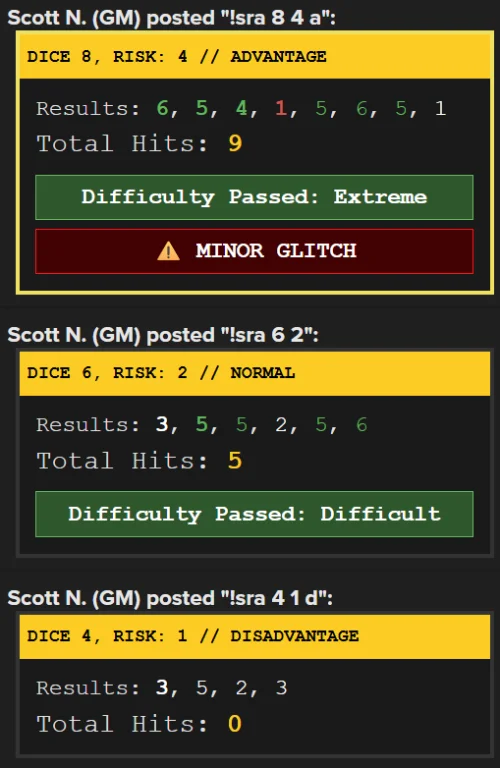
How It Works
This script creates a custom automated dice roller specifically for Shadowrun Anarchy 2.0 within your Roll20 game that is run from chat. Since Shadowrun uses a unique “Dice Pool” system where you look for specific numbers rather than adding them together, this tool handles all that math and formatting for you instantly in the chat.

Requiremements
- Roll20 Pro Subscription: You must have a Pro-tier subscription to access the “API Scripts” feature, as standard or Plus accounts do not support custom JavaScript code.
- Game Creator Permissions: You must be the Creator of the Roll20 game or have been promoted to a GM with permission to edit scripts within that specific game.
- API Sandbox Access: You need access to the API Scripts tab located in the Game Settings page of your Roll20 campaign.
- Enabled Message Content Intent: While primarily relevant for Discord bots, Roll20 scripts require the API Sandbox to be active and “Ready” (not crashed) to process chat commands starting with
!sra. - JavaScript Compatibility: The code must be saved as a
.jsfile or pasted into the Roll20 script editor without any syntax errors, such as missing brackets or parentheses.

Installation
Install the API Script (Requires Pro)
- Go to your Roll20 Game Settings page (outside of the actual game).
- Select API Scripts from the drop-down menu.
- Click the New Script tab.
- Give it a name like SRA2Roller.js.
- Paste the code I provided below into the code window.
- Click Save Script at the bottom.
- Check the “API Console” below the code. If it says “Ready,” you are good to go!
Create the One-Click Macro
- Launch your game and click the Collection Tab (the icon with three horizontal lines in the top right sidebar).
- Click + Add next to Macros.
- Name it: SRA2-Roll
- In the Actions box, paste the code below.
- Set Visible to Players to “All Players.”
Click Save Changes.
!sra ?{Total Dice Pool|6} ?{Risk Dice|1} ?{Modifier|Normal,n|Advantage,a|Disadvantage,d}
How to use it
Either use the macro or the chat.
Macro
- Check the box “In Bar” next to your new macro in the Collection Tab.
- A button will appear at the bottom of your screen.
- Click it, fill in the pop-up boxes, and hit “Submit.”
In Chat
- The format is the command, then the number of dice, the number of these dice are risk dice, then the mode.
- Mode is:
- Normal : target number is 5
- Advantage: target number is 4
- Disadvantage: target number is 6.
- Type
!sra 10 3 ain the chat
(10 dice, 3 risk, advantage). - It will also assume risk is 0, and mode is “Normal”.
- Typing !sra 6 2 (6 dice, 2 risk, target number 5).
- Typing !sra 8 (8 dice, 0 risk, target number 5).
The Code:
on("chat:message", function(msg) {
    // Only trigger if the message starts with !sra
    if(msg.type === "api" && msg.content.indexOf("!sra") === 0) {
        let args = msg.content.split(/\s+/);

        // Identify the sender and the raw command
        let sender = msg.who;
        let commandSent = msg.content;

        // Parse inputs: !sra [pool] [risk] [mode]
        let pool = parseInt(args[1]) || 1;
        let risk = parseInt(args[2]) || 0;
        let modeArg = (args[3] || "n").toLowerCase();

        // Threshold and Header Logic
        let threshold = 5;
        let modeName = "NORMAL";
        if (modeArg === "a") { threshold = 4; modeName = "ADVANTAGE"; }
        else if (modeArg === "d") { threshold = 6; modeName = "DISADVANTAGE"; }

        let actualRisk = Math.min(risk, pool);
        let normalCount = pool - actualRisk;

        let totalHits = 0;
        let riskOnes = 0;
        let diceResults = [];

        // 1. Roll Risk Dice first (BOLD)
        for(let i=0; i < actualRisk; i++) {
            let r = randomInteger(6);
            let color = "white";
            if (r >= threshold) {
                totalHits += 2;
                color = "#5cb85c"; // Green Hit
            } else if (r === 1) {
                riskOnes++;
                color = "#d9534f"; // RED for Risk 1s
            }
            diceResults.push(`<b style="color:${color}">${r}</b>`);
        }

        // 2. Roll Normal Dice (STANDARD)
        for(let j=0; j < normalCount; j++) {
            let r = randomInteger(6);
            let color = "white";
            if (r >= threshold) {
                totalHits += 1;
                color = "#5cb85c"; // Green Hit
            }
            diceResults.push(`<span style="color:${color}">${r}</span>`);
        }

        // Difficulty Tier Logic
        let diffText = "";
        if (totalHits >= 8) diffText = "Extreme";
        else if (totalHits >= 6) diffText = "Hard";
        else if (totalHits >= 4) diffText = "Difficult";
        else if (totalHits >= 3) diffText = "Average";
        else if (totalHits >= 2) diffText = "Easy";

        // Glitch Logic (Risk 1s only)
        let glitchMsg = "";
        let borderColor = "#333";
        if(riskOnes === 1) { glitchMsg = "⚠️ MINOR GLITCH"; borderColor = "#f1e05a"; }
        else if(riskOnes === 2) { glitchMsg = "⚠️ MAJOR GLITCH"; borderColor = "#ff4444"; }
        else if(riskOnes >= 3) { glitchMsg = "🚨 DISASTER!"; borderColor = "#ff0000"; }

        // Construct HTML Output
        let output = `<div style="background:#1a1a1a; border:3px solid ${borderColor}; color:#e0e0e0; font-family: 'Courier New', monospace; padding:0;">` +
                     `<div style="background:#ffcc00; color:black; font-weight:bold; padding:5px; font-size:11px; text-transform:uppercase;">` +
                     `DICE ${pool}, RISK: ${actualRisk} // ${modeName}</div>` +
                     `<div style="padding:10px;">` +
                     `Results: ${diceResults.join(', ')}<br>` +
                     `<div style="margin-top:5px; font-size:1.2em;">Total Hits: <b style="color:#ffcc00;">${totalHits}</b></div>`;

        // Difficulty Box
        if (diffText !== "") {
            output += `<div style="margin-top:10px; padding:5px; background:#2d572c; color:white; font-weight:bold; text-align:center; border:1px solid #5cb85c;">` +
                      `Difficulty Passed: ${diffText}</div>`;
        }

        // Glitch Box
        if(glitchMsg !== "") {
            output += `<div style="margin-top:5px; padding:5px; background:#400; color:white; font-weight:bold; text-align:center; border:1px solid red;">` +
                      `${glitchMsg}</div>`;
        }

        output += `</div></div>`;

        // The first argument here determines the text shown above the box in chat
        sendChat(`${sender} posted "${commandSent}"`, output);
    }
});